INR – Indian Rupee
 EUR – Euro
 NZD – New Zealand Dollar
 PKR – Pakistani Rupee
 PHP – Philippine Peso
 BDT – Bangladeshi Taka
 LKR – Sri Lankan Rupee
 NPR – Nepalese Rupee
 MMK – Myanmar Kyat
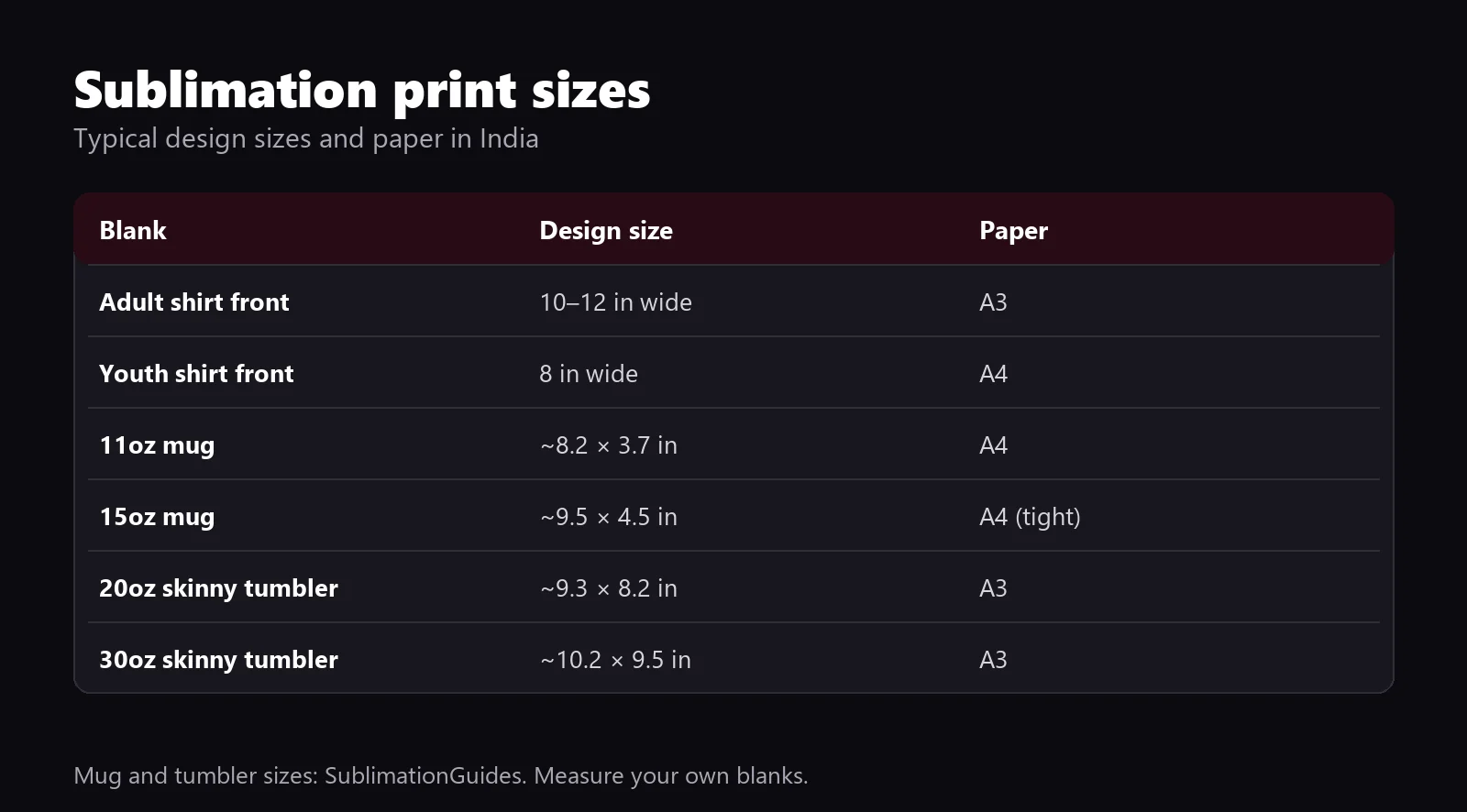
Common sublimation print sizes are about 10–12 inches wide for an adult shirt front, 8.2 × 3.7 inches for an 11oz mug wrap, 9.5 × 4.5 inches for a 15oz mug and about 9.3 × 8.2 inches for a 20oz skinny tumbler. In India, mugs fit on A4 paper and shirt fronts need A3. Print mirrored, on white or light polyester, with the right colour profile.
Sublimation is the most size-sensitive way to print. A shirt design that's half an inch too wide wraps into the side seams, and a mug wrap that's a few millimetres too short leaves a white strip by the handle. Colour is the other surprise: sublimation prints look dull and washed-out on paper and only turn vivid after pressing.
Below are the sizes most printers need, converted for the A4 and A3 paper used in India, and the colour habits that stop prints coming out flat.
What size should a sublimation shirt design be?
An adult sublimation shirt front is usually 10–12 inches wide, a youth front about 8 inches and a toddler front about 6 inches. Full-front and all-over designs can be larger, but need large-format paper or multiple sheets and careful alignment.
Sublimation shirt prints follow the same placement rules as other methods: top edge 3–4 inches below the collar for adults. Our size and placement chart has the full table. The difference is paper: an 11-inch-wide design won't fit on A4 (8.27 inches wide), so you'll need A3 sheets or a wide-format sublimation printer.
What size is an 11oz and 15oz mug sublimation template?
An 11oz mug wrap is about 8.2 inches wide by 3.7 inches tall, and a 15oz mug about 9.5 × 4.5 inches. Leave a small gap at the handle. Both fit on A4 paper, though some 15oz wraps need careful placement or a slightly larger sheet.
| Blank | Typical design size | Paper in India |
|---|---|---|
| Adult shirt front | 10–12 in wide | A3 |
| Youth shirt front | 8 in wide | A4 (portrait) |
| 11oz mug | ~8.2 × 3.7 in | A4 |
| 15oz mug | ~9.5 × 4.5 in | A4 (tight) or larger |
| 20oz skinny tumbler | ~9.3 × 8.1–8.25 in | A4 may be too small; use A3 |
| 30oz skinny tumbler | ~10–10.4 × 9.4–9.7 in | A3 |
Mug and tumbler sizes from SublimationGuides' size chart; paper recommendations are ours, based on A4 (8.27 × 11.69 in) and A3 (11.69 × 16.54 in). Blank sizes vary by supplier, so always measure your actual mug or tumbler.
Why do sublimation prints look dull on paper?
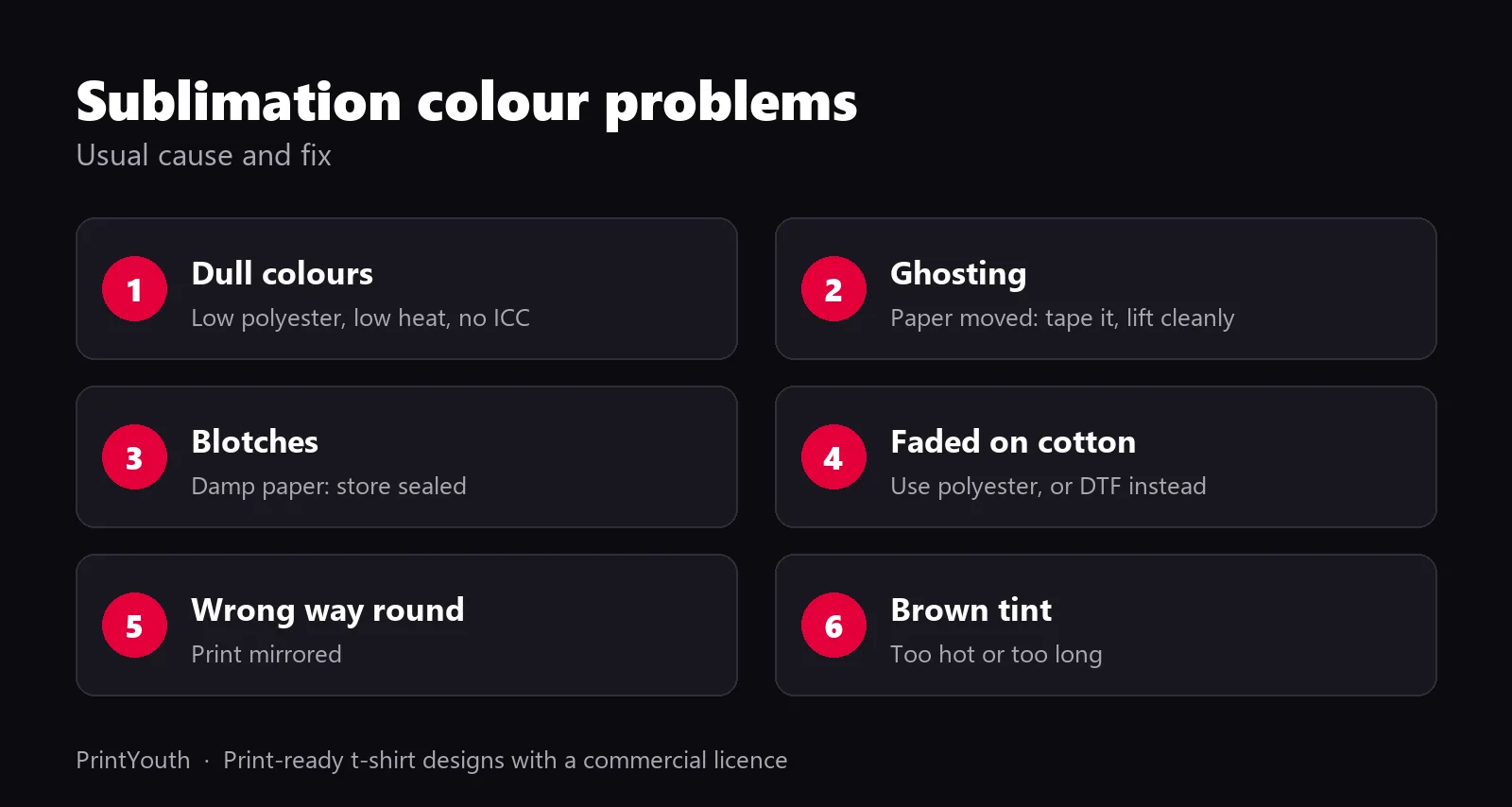
Sublimation ink looks dull and faded on paper because it's printed as a dye that only becomes vivid when heat turns it into gas and bonds it with polyester. That's normal. If the pressed result is still dull, the cause is usually low polyester content, low temperature, too little time or the wrong colour profile.
New sublimation printers often panic at their first print and turn up saturation in the file. Don't. Press a test first. If the pressed colours are too dark or off, then adjust the profile or the design.
How do you get bright colours with sublimation?
Get bright sublimation colours by printing on white or very light polyester (ideally 65% or more polyester), using the ICC colour profile for your ink and paper, printing mirrored, pressing at the temperature and time your paper maker recommends, and keeping paper dry before printing.
- Fabric: white or light polyester; cotton barely holds sublimation dye.
- Colour profile: install the ICC profile from your ink or paper supplier.
- Mirror: print the design mirrored so it reads correctly after transfer.
- Press: follow your paper's settings; many shirt settings fall around 195–205 °C for 45–60 seconds.
- Moisture: store paper sealed; damp paper causes blotches and colour bleeding.
Can you sublimate on cotton or dark shirts?
Not directly. Sublimation dye bonds with polyester, so it fades badly on cotton, and it can't show on dark fabric because the ink is translucent. For cotton or dark shirts, use DTF or another method instead.
This is the single most common sublimation mistake in Indian print shops: a customer brings a black cotton tee and asks for a photo print. That's a DTF job. Sublimation is best for white polyester sports jerseys, mugs, tumblers, mouse pads and full-print polyester shirts.
What file should you use for sublimation designs?
Use a high-resolution PNG at 300 DPI at the final print size, in RGB, with or without a transparent background. Unlike DTF, sublimation doesn't print white, so any white areas simply show the blank's colour, and a white background is harmless on a white blank.
Full-colour illustrations, photos and gradients are where sublimation shines, since it can print smooth tones that DTF and screen printing struggle with. For setup details, see our guide to sublimation file setup.
Frequently asked questions
What size sublimation print for an 11oz mug?
About 8.2 inches wide by 3.7 inches tall, with a small gap at the handle. It fits on A4 paper. Always measure your mug blank, because sizes vary slightly by supplier.
What size is a sublimation shirt print?
About 10–12 inches wide for adults, 8 inches for youth and 6 inches for toddlers. Adult fronts need A3 paper or a wide-format printer.
Why are my sublimation colours not bright?
Common causes are low polyester content, low heat or time, no ICC profile, damp paper or a coloured blank. Fix one at a time and test.
Do sublimation prints need to be mirrored?
Yes. Print the design mirrored so it reads correctly once transferred onto the blank.
Can I use A4 paper for sublimation?
Yes for mugs, small prints and youth shirts. Adult shirt fronts and larger tumblers usually need A3 paper.
What temperature is used for sublimation on shirts?
Many papers recommend about 195–205 °C for 45–60 seconds on polyester shirts. Follow your paper and ink maker's settings, as they vary.
The short version
Shirts 10–12 inches (A3), 11oz mugs 8.2 × 3.7 inches (A4), 15oz mugs 9.5 × 4.5 inches, tumblers on A3. Print mirrored with the right ICC profile, press on white polyester, and expect paper prints to look dull until pressed.
Full-colour artwork suits sublimation well; browse the 70,000 Urban & Typography pack or the All-Over Sublimation section as new packs arrive.
Last updated: 22 November 2026.