INR – Indian Rupee
 EUR – Euro
 NZD – New Zealand Dollar
 PKR – Pakistani Rupee
 PHP – Philippine Peso
 BDT – Bangladeshi Taka
 LKR – Sri Lankan Rupee
 NPR – Nepalese Rupee
 MMK – Myanmar Kyat
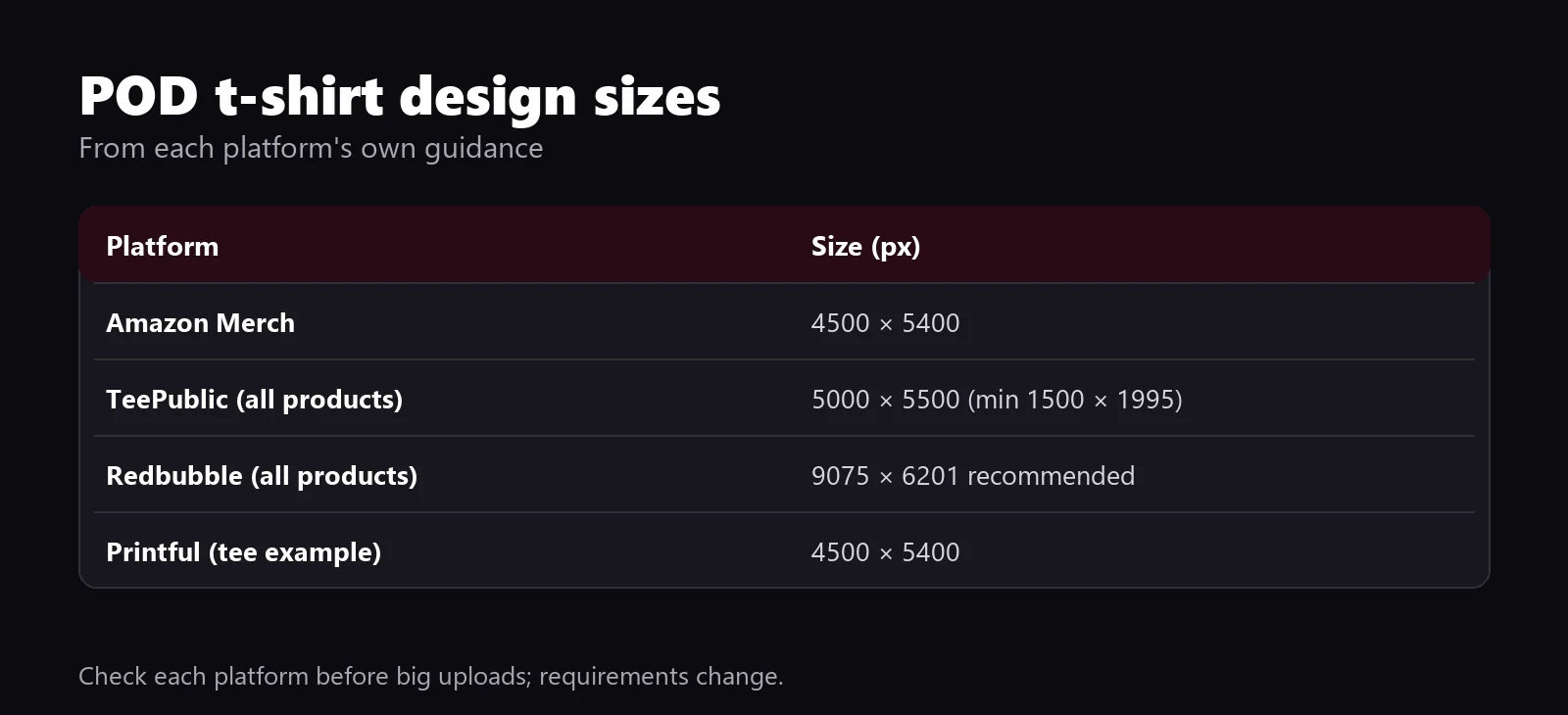
Amazon Merch t-shirts need 4500 × 5400 px. TeePublic needs at least 1500 × 1995 px, and 5000 × 5500 px to enable all products. Redbubble recommends at least 9075 × 6201 px to cover its full product range. Printful uses 4500 × 5400 px as its t-shirt example. Build one large master file and export a version for each platform.
Every print-on-demand platform asks for a different file size, and uploading the wrong one means blurry products, disabled items or a rejected upload. Most sellers upload the same design to several platforms, so the trick is to make one master file that exports cleanly to all of them.
Here are the sizes in one place, from each platform's own guidance, and the workflow that saves you redoing designs.
What design size does each POD platform need?
Amazon Merch uses 4500 × 5400 px for standard t-shirts. TeePublic requires at least 1500 × 1995 px (not counting outer transparent pixels) and 5000 × 5500 px to enable every product. Redbubble recommends 9075 × 6201 px to cover all products. Printful's print-file guide uses 4500 × 5400 px as its t-shirt example.
| Platform | T-shirt file size | Notes |
|---|---|---|
| Amazon Merch on Demand | 4500 × 5400 px | Transparent PNG, 300 DPI, under 25 MB |
| TeePublic | Min 1500 × 1995 px; 5000 × 5500 px for all products | Measured without outer transparent pixels |
| Redbubble | 9075 × 6201 px recommended for all products | Smaller files limit which products are available |
| Printful | 4500 × 5400 px example for tees | 150 DPI minimum at print size for DTG |
Sources: Merch product templates, TeePublic's help centre ("Designing for specific product dimensions"), Redbubble's help article on image size, and Printful's print-file guide. Platforms update their requirements, so check before a big upload.
What are "outer transparent pixels" on TeePublic?
Outer transparent pixels are the empty, fully transparent space around your artwork. TeePublic measures your design without them, so a 4500 × 5400 canvas with a small design in the middle may count as much smaller. Trim empty space, or make sure the artwork itself meets the size.
This catches many sellers who reuse Merch files: the canvas is big enough, but the artwork inside isn't. Use "Trim" in Photoshop or Photopea to check the true artwork size before uploading.
How do you make one file work for every platform?
Create a large master design, ideally vector or at least 6000 px on its longest side, then export a version per platform: 4500 × 5400 for Merch and Printful, a trimmed large PNG for TeePublic, and the largest export you can make for Redbubble. Name exports by platform so nothing gets mixed up.

- Design big: vector, or a raster canvas at least 6000 px tall.
- Keep artwork centred with sensible empty space.
- Export Merch / Printful: 4500 × 5400 px canvas, transparent PNG.
- Export TeePublic: trimmed artwork, as large as possible (5000 × 5500 px enables all products).
- Export Redbubble: the largest version, aiming for its recommended size.
- Name files clearly:
wolf-merch.png,wolf-teepublic.png,wolf-redbubble.png.
Vector source files make this easy because they scale without blur. See vector vs PNG for why.
Can you upload the same design to all platforms?
Yes, if you own the design or your licence allows print-on-demand platforms. Many sellers list the same designs on Merch, TeePublic, Redbubble and their own store. PrintYouth's licence explicitly covers Merch by Amazon, Redbubble, TeePublic, Printful, Printify, Spreadshirt and Etsy.
Each platform also enforces its own content rules. Original designs with no brand names, characters or celebrity references pass on all of them. For Merch specifics, see Amazon Merch t-shirt designs.
Frequently asked questions
What size is a TeePublic design?
At least 1500 × 1995 px, not counting outer transparent pixels. To enable all TeePublic products, use 5000 × 5500 px.
What size should Redbubble t-shirt designs be?
Redbubble recommends at least 9075 × 6201 px to cover its full product range. Smaller files work for some products but limit others.
What size is an Amazon Merch design?
4500 × 5400 px at 300 DPI, as a transparent PNG under 25 MB.
Can I use one design file for all POD sites?
Use one master file and export a version for each platform's size. A single export rarely fits every platform perfectly.
Why is my design small on Redbubble products?
Usually the file is too small for that product, or has lots of empty transparent space. Upload a larger, trimmed file.
Do bundle designs work on these platforms?
Yes, if they're large enough and the licence allows POD use. Bundles with vector EPS files scale easily to each size.
The short version
Merch and Printful 4500 × 5400; TeePublic 5000 × 5500 for all products (artwork measured without empty space); Redbubble around 9075 × 6201. Design one big master, export per platform, and name files clearly.
Large, scalable files for every platform: the Mega Typography Bundle and the Unlimited Streetwear Bundle, both with vector EPS.
Last updated: 22 November 2026.