INR – Indian Rupee
 EUR – Euro
 NZD – New Zealand Dollar
 PKR – Pakistani Rupee
 PHP – Philippine Peso
 BDT – Bangladeshi Taka
 LKR – Sri Lankan Rupee
 NPR – Nepalese Rupee
 MMK – Myanmar Kyat

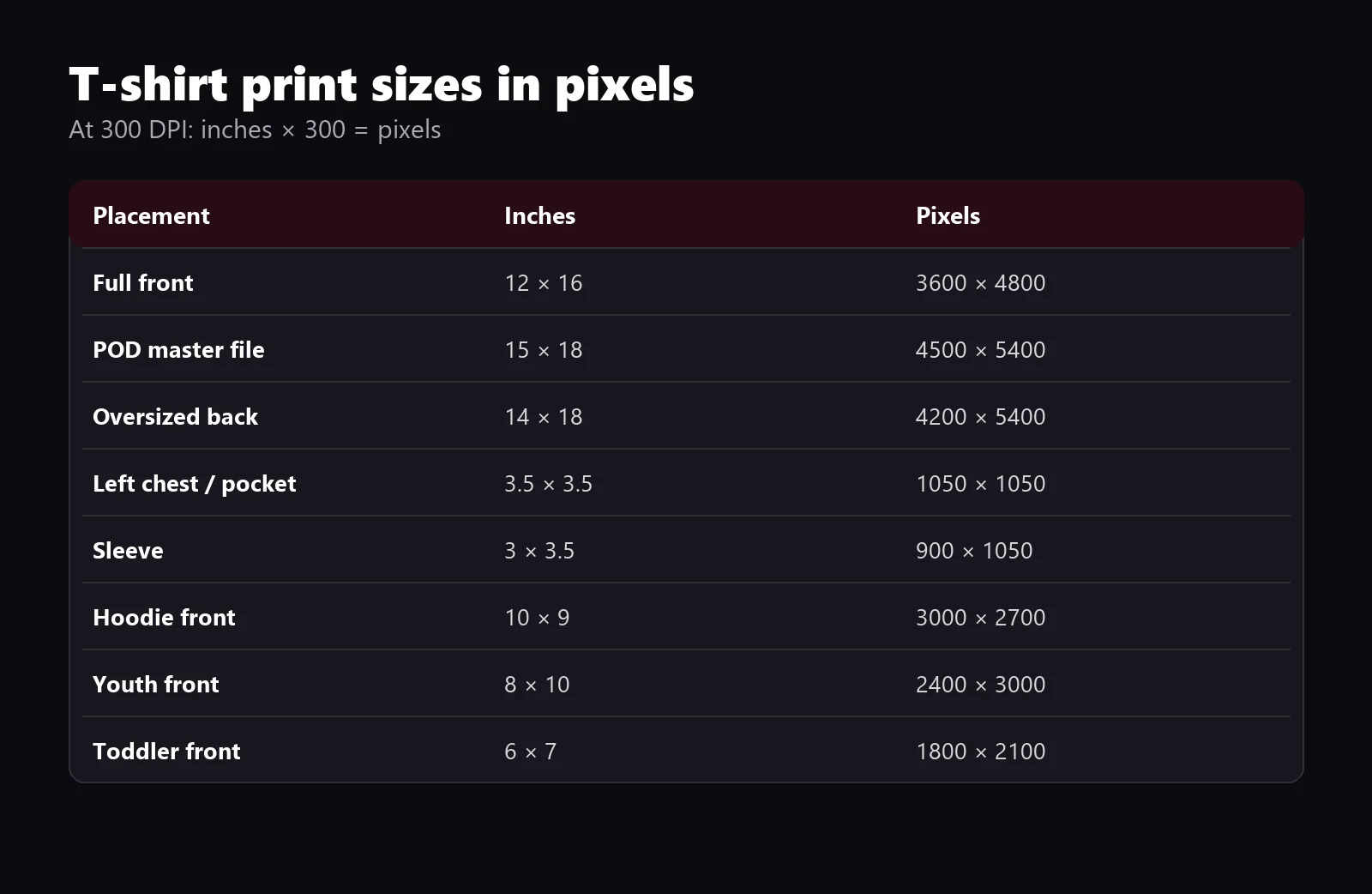
The standard t-shirt design size is 12 × 16 inches, which is 3600 × 4800 pixels at 300 DPI. Many print-on-demand platforms ask for 4500 × 5400 pixels (15 × 18 inches) so the file covers their largest print area. A pocket or left-chest design is about 3.5 × 3.5 inches, or 1050 × 1050 pixels.
Pixel size is the one number that decides whether a t-shirt print looks crisp or soft, and it's the number most people get wrong. They design on a phone-sized canvas, export a 1080 × 1080 image, and then wonder why the print looks fuzzy at 12 inches wide.
Here is every common placement in pixels, inches and centimetres, plus the canvas setup that saves you from resizing later.
What is the best pixel size for a t-shirt design?
The best pixel size for a standard adult front print is 3600 × 4800 pixels, which equals 12 × 16 inches at 300 DPI. If you upload to print-on-demand platforms, make 4500 × 5400 pixels your master size, since that's a widely used template size and covers their largest print area.
Printful's print file guide uses 4500 × 5400 px as its example of a t-shirt file, and recommends 150 DPI at print size as the minimum for apparel printed by DTG. For DTF and screen printing, most printers in India ask for 300 DPI. Working at 300 DPI keeps you safe everywhere.
| Placement | Inches | Centimetres | Pixels at 300 DPI |
|---|---|---|---|
| Full front (standard) | 12 × 16 | 30 × 41 | 3600 × 4800 |
| POD master file | 15 × 18 | 38 × 46 | 4500 × 5400 |
| Full back | 12 × 16 | 30 × 41 | 3600 × 4800 |
| Oversized back | 14 × 18 | 36 × 46 | 4200 × 5400 |
| Left chest / pocket | 3.5 × 3.5 | 9 × 9 | 1050 × 1050 |
| Sleeve | 3 × 3.5 | 7.5 × 9 | 900 × 1050 |
| Hoodie front | 10 × 9 | 25 × 23 | 3000 × 2700 |
| Youth front | 8 × 10 | 20 × 25 | 2400 × 3000 |
| Toddler front | 6 × 7 | 15 × 18 | 1800 × 2100 |
Is 300 DPI necessary for t-shirt printing?
300 DPI at print size is the safe standard for DTF, screen printing and sublimation. DTG platforms such as Printful accept 150 DPI at print size for apparel. Below 150 DPI, edges and fine details start to look soft, especially on large prints.
Here's the part that confuses people: the DPI number saved inside a file means nothing without the pixel count. A 72 DPI image that's 3600 pixels wide prints a sharp 12-inch design once you set it to 300 DPI. A 300 DPI image that's 1000 pixels wide is only good for about 3.3 inches. Always check pixels, not the DPI label.
The formula is simple: inches × 300 = pixels, and pixels ÷ 300 = the largest sharp print in inches.
What size should a hoodie design be in pixels?
A hoodie front design is usually about 10 inches wide and 9 inches tall, or 3000 × 2700 pixels at 300 DPI, so it fits between the hood strings and the kangaroo pocket. A hoodie back can take a full 12 × 16 or 14 × 18 inch design.
The pocket is what limits hoodie fronts. A tall design runs into the pocket seam, and heat presses can't apply even pressure over that ridge. Make hoodie fronts wider than they are tall, or move the main graphic to the back and keep a small chest logo on the front.
What size is a pocket or left-chest design?
A pocket or left-chest design is usually 3–4 inches wide; 3.5 × 3.5 inches (1050 × 1050 pixels) is a common size. It sits 3–4 inches below the shoulder seam, centred over the left side of the chest.
Small designs need bolder details. A logo with thin lines and small text that looks fine at 12 inches becomes unreadable at 3.5 inches. When you shrink a front design for the chest, simplify it: drop fine textures, thicken strokes and keep only one or two words.
How do you set up a canvas for a t-shirt design?
Set up a t-shirt canvas at the final print size at 300 DPI, usually 3600 × 4800 or 4500 × 5400 pixels, in RGB colour, with a transparent background. Design inside it, keep important elements away from the edges, and export a PNG.
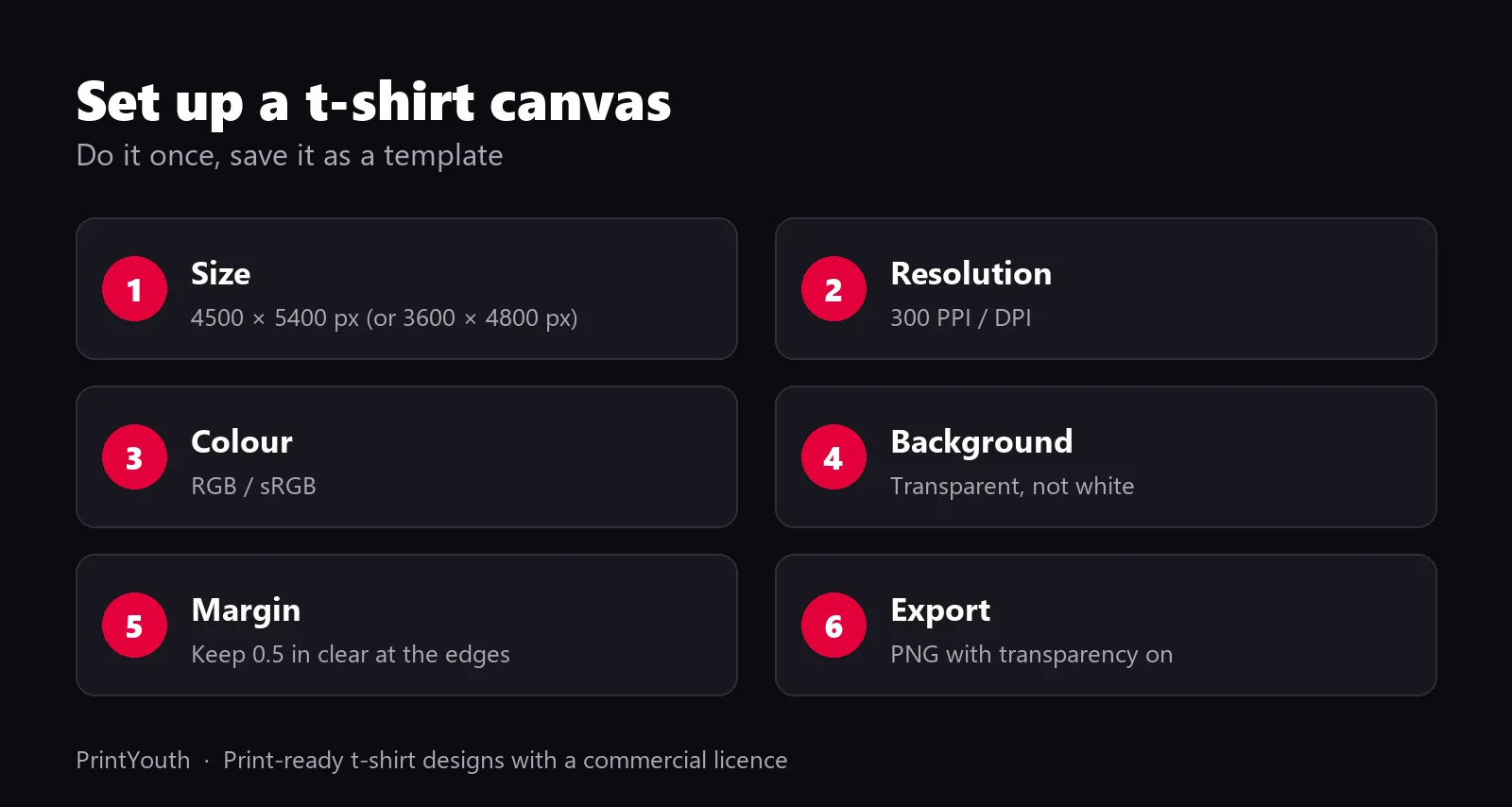
- Photoshop or Photopea: New file → 4500 × 5400 px, 300 PPI, RGB, transparent background.
- Canva: Custom size → 4500 × 5400 px. Export as PNG with "transparent background" ticked (a paid feature).
- Illustrator: Artboard 15 × 18 inches; export PNG at 300 PPI with transparency on.
- Save the empty canvas as a template so every new design starts the same size.
- Keep 0.5 inch of empty margin inside the canvas edges; printers crop or shift slightly.
Can you enlarge a small image for t-shirt printing?
You can enlarge a small image, but simple resizing only stretches the pixels and makes the print look soft or blocky. AI upscalers improve photos and simple graphics, but they can invent odd details. For best results, start with a design that's already large enough, or a vector file.
Scaling down is always safe; scaling up never truly adds detail. That's why it pays to start from big source files. Every PrintYouth design is a transparent PNG large enough for a full adult print, and the bigger bundles include EPS vector files you can scale to any size without blur.
Frequently asked questions
What size PNG do I need for a t-shirt?
For a full front print, use a PNG of 3600 × 4800 pixels (12 × 16 inches at 300 DPI). For print-on-demand platforms, 4500 × 5400 pixels is a safe master size.
Is 1080 × 1080 pixels enough for a t-shirt print?
Only for a small print, about 3.6 inches wide at 300 DPI. It's fine for a pocket logo but too small for a full front, where it will look soft.
What is the standard t-shirt design size in inches?
12 inches wide by 16 inches tall is the standard full-front print area for adult tees, though many designs are 10–12 inches wide and shorter.
What size should a t-shirt design be in cm?
About 30 × 41 cm for a full front. Most adult front prints are 25–30 cm wide, depending on shirt size.
Do I need 300 DPI for DTG printing?
Printful accepts 150 DPI at print size for DTG apparel, but 300 DPI gives extra safety and also works for DTF, screen printing and sublimation.
What size is a back print for an oversized t-shirt?
Oversized tees take larger back prints, around 14 × 18 inches, which is 4200 × 5400 pixels at 300 DPI.
The short version
Design at 4500 × 5400 px (or 3600 × 4800 px for a standard front) at 300 DPI on a transparent canvas, then export smaller versions for chest, sleeve and kids' prints. Check pixels, not the DPI label, and never rely on enlarging a small file.
Files that already meet these sizes are in the Mega Typography Bundle and the Unlimited Streetwear Bundle, both with editable EPS and PSD.
Last updated: 22 November 2026.